
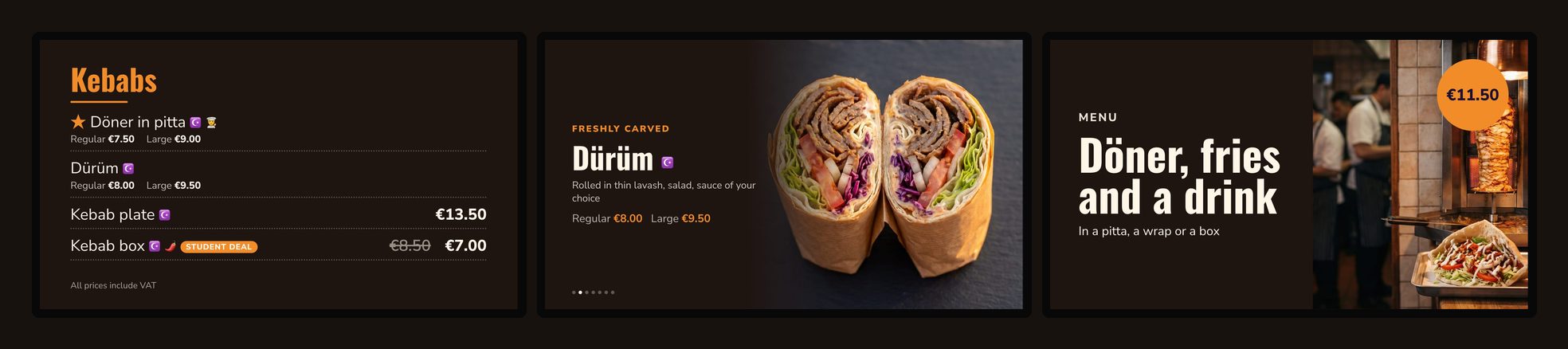
A kebab shop’s menu changes more often than it looks: the price of meat goes up, a dish sells out at 23:00, students get a deal in exam week, the shop stays open until 4 am at the weekend. On printed boards or a menu video on a USB stick, each change means a new print or a new order to a designer. With easyCMS you change it yourself, in Studio, from your phone, and the screens above the counter update on their own.
Every picture on this page is a real screenshot of an easyCMS template, playing a sample kebab menu.
Ready-made sets
Studio also has sets for several screens side by side. The Kebab counter set is three screens: the kebab menu, the döner spotlight and the combo, the wall at the top of this page. Kebab and sauces is two: the menu and the sauce wall.
Changing the menu
Your menu lives in one place in Studio, under Menu & prices, and every board reads it. Change a price there and every screen showing that dish updates, without opening the board itself.
Sizes
Regular and large, small and medium and large, or a portion of 6 and 12: as many sizes as you need, each with its price.
Sold out
One tap and the dish shows “Sold out” on the menu, and the spotlight skips it, until you switch it back.
Labels
Halal, vegan, vegetarian, spicy, gluten free, new and house special, shown as small symbols next to the name.
Allergens
The 14 allergens EU law lists, stored with each dish, so whoever is at the counter can answer when a customer asks. They are not printed on the board.
Photos
Add your own photo to each dish, or use the stock photos in Studio until you have taken yours.
Your menu is already written: import it
In Menu & prices, choose Import and give Studio a photo of your current board or printed menu, a PDF, an Excel file, or the text pasted from your website. It reads the dishes, prices and sizes, and shows them to you to check before anything is saved. Check the prices: the import is quick, but you are the one who knows the right price.
What you need in the shop
Screens. Above a counter, 43 to 55 inches for three to four metres away. A menu board shows the same picture for hours, so a professional screen made for long hours is the safe choice; a consumer TV works, but switch it off at night. In a window facing the sun, a normal screen is hard to read in daylight: you need a high-brightness one.
Each screen also needs something to play on:
The easyCMS Android player
The easyCMS Android player, 499€, arrives ready to plug in, with a display licence included.
An Android box you already have
An Android box or Android TV: type myeasycms.com/apk in its browser to install the player (how).
A Windows PC
A Windows PC connected to the screen runs the easyCMS player, and the player itself is free.
A Samsung or LG professional screen
Samsung (Tizen) and LG (webOS) professional screens run the player themselves, with no box at all.
What it costs
Three screens above the counter
| Line | Cost |
|---|---|
| easyCMS account, up to 5 screens, includes 1 licence | 49€ once |
| 2 × extra licence at 66€, in the same order | 132€ once |
| Software total | 181€ once |
Licences are 66€ each when you buy them in the same order as the account, and 99€ each when added later. The kebab templates, the menu, the import and the sets are included: there is nothing else to buy for them.
Compared with the other ways
| Year 1 | After 5 years | |
|---|---|---|
| easyCMS, 3 screens | 181€ | 181€ |
| A signage subscription at 10 USD per screen per month | 360 USD | 1,800 USD |
| A designer’s menu video on a USB stick, about 100 USD per screen | about 300 USD | about 300 USD more for every menu change |
10 USD a month is roughly the middle of the per-screen prices in our Digital Signage Pricing Index, checked on the vendors’ own pages in October 2026. The menu video price comes from freelance offers listed on Comeup in October 2026, between 86 and 137 USD for one animated screen. A video costs nothing more until a price changes, and then it has to be made again.
Prices are for the software and the content. Screens and players come on top in every case.
What easyCMS will not do
No link to your till
Prices are set in Studio. They do not come from your cash register or ordering system, and a sale at the till does not mark a dish sold out.
No orders
The boards show the menu. There is no ordering or payment from the screen.
No design from scratch
You start from the templates and change the colours, fonts, photos and texts yourself. If you want someone to do it with you, an expert hour is 25€.
Questions kebab shops ask
Can I show prices in two sizes?
Yes. Give a dish as many sizes as you need, regular and large for example, each with its own price. The menu board shows them on one line under the name.
Can I use my own photos?
Yes. Add a photo to each dish in Studio, from your phone’s camera or your computer. The photo cards, the spotlight and the dish of the day use it.
What happens when the internet goes down?
The screens keep playing the last menu they received, and pick up your changes when the connection is back.
Can I run several shops from one account?
Yes, one account runs all your screens, in one shop or several. Use one menu for every shop, or a menu for each shop with its own prices. The PRO account runs up to 25 screens.
Is the halal label official?
No. The label shows on the board when you set it on a dish. It is your statement about your food, not a certification.
More menu boards
Not only kebab: there are templates for pizzerias, burgers, fries and snacks, ice cream, waffles, bakeries, cafés and more. See all menu board templates the pizzeria menu board and the friterie menu board, or read about digital menu board software in general.