Blog

Proof of Play: What It Is and When You Need It

Proof of play records what played, on which screen, when and for how long. The three cases that genuinely need it, and what the reporting costs.

Proof of play is a record of what played, on which display, when it played, and for how long. It is the difference between believing your content ran and being able to show that it ran. Most digital signage projects never need it, and the ones that do usually need it because somebody else is paying for the screen time.

This article explains what a proof-of-play record contains, the three situations that genuinely require one, the many that do not, and what the reporting costs on easyCMS against a per-screen subscription.

What a proof-of-play record actually is

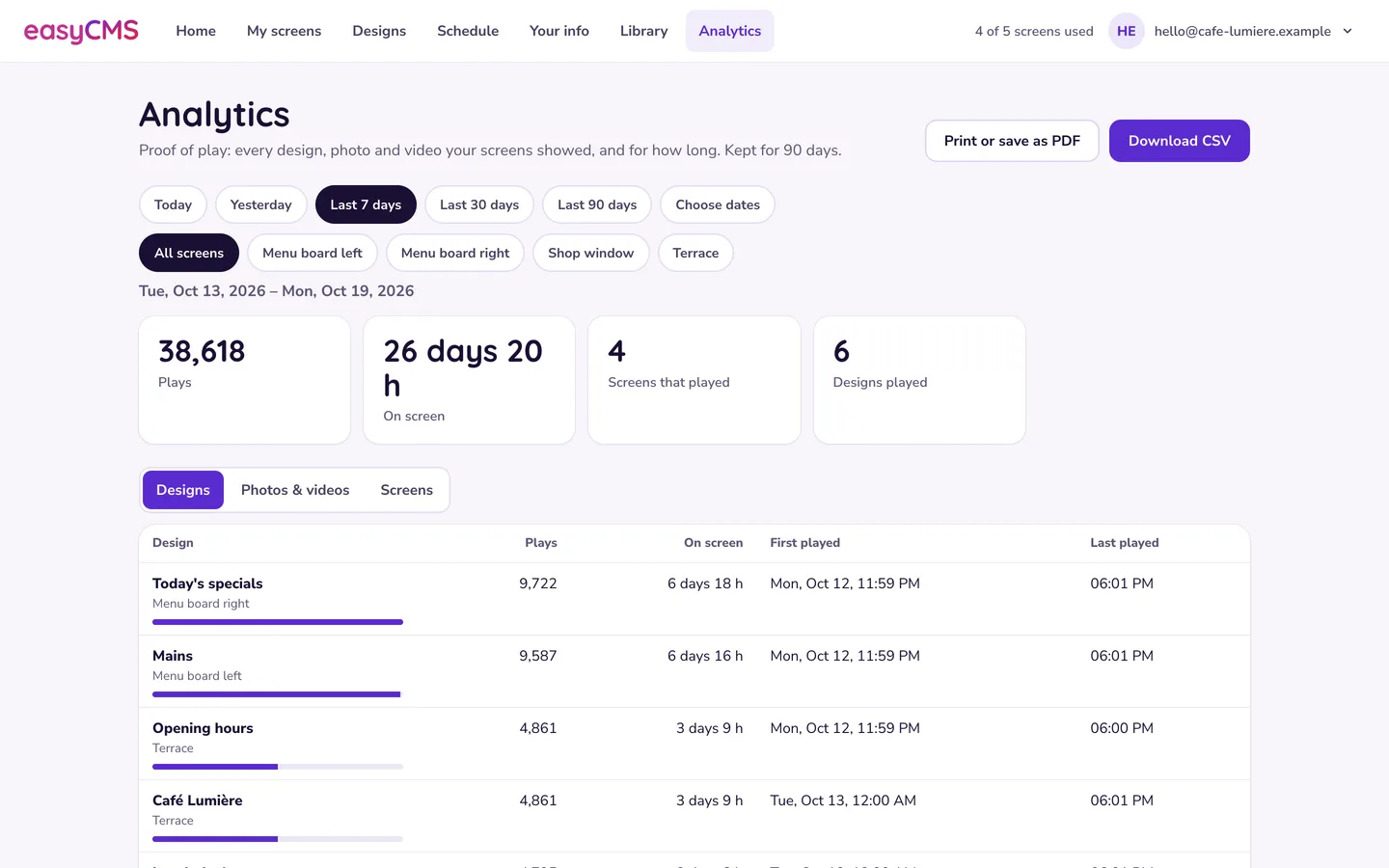
Each time a player finishes showing an item, it writes down what it just did. The player keeps those notes locally and sends them to the CMS at its next check-in. The CMS gathers them from every display and turns them into a report you can filter by date range and by display.

A single record answers a small, specific set of questions.

Field What it tells you
Display Which screen it played on
Layout Which design was on the screen at the time
Media or widget The specific item inside that layout
Start and end When it began and when it finished
Duration How long it was on screen
Number of plays How many times it ran in the period you selected

That is the whole idea. There is nothing clever in it, and the lack of cleverness is the point: a proof-of-play report is evidence, so it has to be boring, complete and reproducible.

Note what is missing. There is no measure of how many people were in the room, no dwell time, no attention. Proof of play proves playback. It does not prove anybody looked. Anyone who tells you their proof-of-play report demonstrates audience is selling you something else.

The three cases that genuinely need it

You are selling screen time to a third party

This is the main one. If a shop, gym, clinic, restaurant group or transport hub sells advertising slots to brands, the advertiser is buying a number of plays across a defined period. At the end of the month they want a report, and “trust us, it ran” is not a report. Proof of play is what makes the invoice defensible and the renewal conversation easy.

It also protects you in the other direction. When a campaign underperforms, the first question is always whether it actually played. A report that shows 1,840 plays across six screens in thirty days ends that conversation in one line. If advertising is the business model behind your network, start with our overview of digital signage for advertising and treat reporting as part of the product you are selling, not an extra.

You have a contractual or franchise obligation

A brand supplies content to franchisees and requires that it runs. A supplier pays for placement in a retail chain. A landlord promises tenants a share of the loop in a shared lobby. In each case somebody has promised in writing that particular content would appear on particular screens, and somebody else is entitled to check.

Franchise networks are the clearest example. Head office sends the seasonal campaign, and the question at the end of the quarter is which sites ran it and which quietly kept the old one on screen. Proof of play answers that per site, without a phone call.

You are subject to compliance or audit

Some content is not marketing. A safety briefing on a factory floor, a regulated notice in a clinic waiting room, a mandatory disclosure in a branch. If an auditor can ask “show me that this notice was displayed during opening hours in March”, you need records rather than recollection.

Good to know Proof of play is a business record. If you are going to rely on it, decide now how long you keep reports and who can produce them, in the same way you would for any other audit trail.

The many cases that do not need it

Most screens do not need proof of play, and paying for it out of habit is a waste.

You almost certainly do not need it if the screens show your own content to your own customers or staff, and nobody outside your organisation has a claim on the screen time. A menu board in your own restaurant, a welcome screen in your own reception, a shift board in your own warehouse, a promotion for your own products. Nobody is going to audit you on your own menu.

For those deployments the real question is not “did item 47 play for 15 seconds at 10:32”. It is “is the screen on and showing the right thing today”. That is a monitoring question, not a reporting one, and it is answered by the tools included with every account: last check-in time, connectivity status, and an on-demand screenshot of what a display is showing right now. See display monitoring for how those work.

If you find yourself wanting proof of play so you can prove to a colleague that the screen has been working, buy the monitoring habit instead. Look at the display list once a week for last check-in and connectivity, and pull a screenshot when someone reports a problem.

Where proof of play sits in the easyCMS tiers

Plainly: proof-of-play reporting is on the PRO account at 299€ one-time and on Enterprise at 1290€ per year. It is not on the 49€ account.

That gap is deliberate, and it is the single clearest reason to buy PRO. The 49€ account gives you a lifetime account, one display licence, 1GB of storage, up to five displays and every core feature including monitoring and screenshots. PRO raises the ceiling to 25 displays and 5GB of storage, and it adds the reporting. If you can answer yes to any of the three cases above, that is your tier. If you cannot, the standard account is very likely enough and you should keep the 250€.

Every account includes one display licence. On the standard and PRO accounts, further licences are 66€ each when they go through checkout in the same order as the account, a discount applied automatically with no code to enter, and 99€ each if you add them later. On Enterprise the licence price depends on the platform: Android, LG webOS and Samsung Tizen displays are 49€ each, because those carry a commercial player licence we buy in, and Windows and Linux displays carry no licence charge at all, because that player software is free. The full arithmetic for a whole estate, hardware included, is in our cost per screen breakdown, and the current list is on the pricing page.

What the same capability costs on a subscription

Reporting is a commonly gated feature across the industry, which makes it a useful thing to price. OptiSigns puts the equivalent behind its Pro tier at $12.50 per screen per month, checked September 2026. Here is what that means as the screen count grows, against a one-time easyCMS PRO build bought in a single order: the 299€ PRO account, which includes the first display licence, plus 66€ for each further display.

Screens OptiSigns Pro at $12.50 per screen/month, per year easyCMS PRO bought in one order
5 $750 563€ once (299€ PRO + 4 licences at 66€)
10 $1,500 893€ once (299€ PRO + 9 licences at 66€)
25 $3,750 1,883€ once (299€ PRO + 24 licences at 66€)

Competitor pricing taken from the vendor’s own pricing page and checked September 2026. We do not convert currencies, so read the two columns as two shapes rather than one subtraction: one line repeats every year, the other stops. Three years of that subscription is $2,250 for five screens, $4,500 for ten and $11,250 for 25. Five years is $3,750, $7,500 and $18,750. The easyCMS column does not move in year two, or in year five.

Only one thing changes it, and that is buying the licences later instead of with the account. Added later they are 99€ each, so the same networks at list are 695€ for five screens, 1,190€ for ten and 2,675€ for 25. In euro terms, a 25-screen PRO build bought in one order is 1,883€, which is 75€ per screen once, and a subscription at 11.30€ per screen per month (Xibo Cloud Enterprise, checked September 2026) passes that in the seventh month. Built a screen at a time at 99€ a licence it is 107€ per screen, and the same subscription passes that in the tenth month.

Now the honest part.

OptiSigns and Yodeck both have genuinely free tiers, and easyCMS does not. Yodeck is free for one screen forever. OptiSigns is free for up to three screens, with the OptiSigns logo on screen and community support only. Neither free tier is where reporting lives, but if you are testing whether a screen is worth having at all, start there rather than with us.

Renting also wins for short campaigns. Three months of reporting on five screens at $12.50 per screen per month is $187.50. There is no version of buying a 299€ account that beats that for a single quarter. Proof of play for a pop-up, an exhibition or a one-off seasonal push is a rental, not a purchase.

And the per-screen price you pay elsewhere buys a whole platform, not just a report. If a competitor’s template gallery, app library or integrations are the reason your project works, the reporting line item is not what should decide it. For a longer look at the recurring-versus-one-time question, see digital signage with no monthly fee, compared.

Gotchas that make a report wrong

Proof of play is only worth having if it is accurate. Four practical things catch people out.

An offline player still plays, but its records arrive late. Players cache content and keep going without a connection, which is exactly what you want on the wall. The reporting side of that is that the records for those hours sit on the device until it reconnects. So a report you run on the first of the month may be incomplete for a site that was offline over the weekend. Wait for the displays to check in before you send anything to an advertiser, and check the connectivity status first. Troubleshooting offline displays covers getting them back.

Watch out Never run a proof-of-play report and invoice from it in the same five minutes. Confirm every display in the report has checked in recently, then run it.

Clocks and timezones decide your timestamps. A record is only as good as the clock that made it. A player with a drifting or wrong system time produces records with wrong times on them, and nobody notices until an advertiser queries a slot. If your screens sit in more than one timezone, agree with the other party which clock the report is expressed in before you send the first one, and put it in the contract. Our guide to timezones and dayparting is worth reading before you schedule a campaign that has to run in a specific window.

Screenshots and proof of play are different kinds of evidence. A screenshot proves a moment: this display was showing this, when I asked. Proof of play proves a period: this item ran this many times between these dates. Screenshots are excellent for support and useless for billing. Reports are the opposite. Use both for what they are.

A report can only count what was scheduled. If a campaign never made it onto the right display, the report will faithfully show that it did not play. That is the report doing its job, but it is a lot less painful to find out in week one than in week four. Check the first day’s figures on any campaign you are being paid for.

The short version

Proof of play records what played, where, when and for how long. Buy it if you sell screen time, if you have promised in writing that specific content runs, or if somebody can audit you. Skip it if the screens show your own content to your own audience, and rely on monitoring and screenshots instead.

On easyCMS it comes with the PRO account at 299€ one-time or with Enterprise, not with the 49€ account, and it is the clearest single reason to move up a tier. If you are unsure which side of that line you are on, describe the deployment to us at info@myeasycms.com or call +48 509 937 137, and we will tell you straight.

Related reading: digital signage for advertising, pricing, and digital signage cost per screen.

Put your screens to work today

One payment of 49€, your first display licence included. Nothing renews, and expert support comes with it.

---